Sunday, August 26, 2012

Minimize page size for Public Website


In order to minimize the page load times and page sizes for anonymous users that do not require all the SharePoint scripts (because they can't use the ribbon anyway) can be done by combining the ideas of my previous posts.

Here's how:
1) Deploy different masterpage for the anonymous/public side and the authenticated/CMS side
In the anonymous one you can get rid of fall the stuff that's only useful for the CMS side, like the ribbon and all the styling required for it. The CMS side is a normal SharePoint masterpage.
2) Switch between the masterpage when the page is loading based on whether the Page is in edit mode or whether the current zone is the public one or the authenticated one. Here's a code example of doing this by extending the SharePoint Pages class. This should also by possible by using a HTTPModule, when I have a code example I'll post that one too. 
3) That's it!

Look at this example of a working masterpage that is quite minimal. It does still output some gunk that still needs removing, but the page size already dropped by 2/3's. When I get it completely right I think it will drop by another 50%. (NB: It's an HTML5 masterpage so you should change some things, like the DOCTYPE, before you can use it as a normal XHTML masterpage for anonymous users)

Minimal Anonymous Master Page


<%@ Master Language="C#" %>
<%@ Register TagPrefix="SharePoint" Namespace="Microsoft.SharePoint.WebControls" Assembly="Microsoft.SharePoint, Version=14.0.0.0, Culture=neutral, PublicKeyToken=71e9bce111e9429c" %>
<%@ Register TagPrefix="Utilities" Namespace="Microsoft.SharePoint.Utilities" Assembly="Microsoft.SharePoint, Version=14.0.0.0, Culture=neutral, PublicKeyToken=71e9bce111e9429c" %>
<%@ Import Namespace="Microsoft.SharePoint" %>
<%@ Assembly Name="Microsoft.Web.CommandUI, Version=14.0.0.0, Culture=neutral, PublicKeyToken=71e9bce111e9429c" %>
<%@ Import Namespace="Microsoft.SharePoint.ApplicationPages" %>
<%@ Register TagPrefix="WebPartPages" Namespace="Microsoft.SharePoint.WebPartPages" Assembly="Microsoft.SharePoint, Version=14.0.0.0, Culture=neutral, PublicKeyToken=71e9bce111e9429c" %>
<%@ Register Tagprefix="SharePointWebControls" Namespace="Microsoft.SharePoint.WebControls" Assembly="Microsoft.SharePoint, Version=14.0.0.0, Culture=neutral, PublicKeyToken=71e9bce111e9429c" %>
<%@ Register TagPrefix="Wiersema" Namespace="CapGemini.Microsoft.Wiersema.Utilities" Assembly="CapGemini.Microsoft.Wiersema,Version=1.0.0.0,Culture=neutral,PublicKeyToken=f9b45bece6cd4a03" %>
<%@ Register TagPrefix="WiersemaControls" TagName="SimpleSearchBox" Src="~/_controltemplates/CapGemini.Microsoft.Wiersema/SimpleSearchControl.ascx" %>
<%@ Register Tagprefix="PublishingWebControls" Namespace="Microsoft.SharePoint.Publishing.WebControls" Assembly="Microsoft.SharePoint.Publishing, Version=14.0.0.0, Culture=neutral, PublicKeyToken=71e9bce111e9429c" %>

<!DOCTYPE html>
<html id="Html1" lang="<%$Resources:wss,language_value%>" dir="<%$Resources:wss,multipages_direction_dir_value%>" runat="server" >
<head id="Head1" runat="server">
    <meta charset="UTF-8" />  

    <title id="onetidTitle">
        <asp:ContentPlaceHolder ID="PlaceHolderPageTitle" runat="server">
            <SharePointWebControls:ListProperty ID="ListProperty1" Property="Title" runat="server"/> - <SharePointWebControls:FieldValue ID="FieldValue1" FieldName="Title" runat="server"/>
        </asp:ContentPlaceHolder>
    </title>
   
    <SharePoint:DelegateControl ID="DelegateControl1" runat="server" ControlId="AdditionalPageHead" AllowMultipleControls="true" />
    <!-- changed icon url -->
    <SharePoint:SPShortcutIcon runat="server" IconUrl="/_layouts/images/kpidefault-0.gif"/>
    <asp:ContentPlaceHolder ID="PlaceHolderBodyAreaClass" runat="server" />
    <asp:ContentPlaceHolder ID="PlaceHolderTitleAreaClass" runat="server" />
    <SharePoint:SPPageManager ID="SPPageManager1" runat="server" />
    <SharePoint:SPHelpPageComponent ID="SPHelpPageComponent1" Visible="false" runat="server" />
   
    <!-- html 5 styles -->
    <link rel="stylesheet" href="/_layouts/CapGemini.Microsoft.Wiersema/html5/css/style.css">

    <asp:ContentPlaceHolder ID="PlaceHolderAdditionalPageHead" runat="server" />

    <PublishingWebControls:AuthoringContainer runat="server" id="AuthoringContainer1" DisplayAudience="ReadersOnly">
        <Wiersema:StopJSPrefetchControl ID="StopPrefetch" runat="server" />
    </PublishingWebControls:AuthoringContainer>
 
     
</head>
<body id="body" runat="server">
    <form id="Form1" runat="server">
     
    <WebPartPages:SPWebPartManager ID="m" runat="Server" />
   
    <SharePoint:SPNoScript ID="SPNoScript1" runat="server" />
            <div id="MSO_ContentDiv" runat="server">
                <div id="s4-mainarea" class="s4-pr s4-widecontentarea">
                    <div class="site">
                        <!-- HEADER BLOCK Start -->
                        <!-- <div class="NutriciaUpHeader"></div> --><!-- end of NutriciaUpHeader -->
                        <div class="html5master">
                        </div>
                   <div class="WiersemaWrapper">
                            <div class="WiersemaBodyWrapper">
                       <Wiersema:HTMLSwitchPanel CurrentTagType="header" runat="server">
                                    <div class="WiersemaLogo">                                      
                                    </div>
                                    <div class="DivsearchFrm">
                                        <fieldset class="searchFrm">
                                            <div id="s4-searcharea" class="s4-search s4-rp">
                                                <asp:ContentPlaceHolder ID="PlaceHolderSearchArea" runat="server">
                                                    <WiersemaControls:SimpleSearchBox runat="server"></WiersemaControls:SimpleSearchBox>
                                                </asp:ContentPlaceHolder>
                                            </div>
                                        </fieldset>
                                    </div>
                                    <Wiersema:HTMLSwitchPanel CurrentTagType="nav" runat="server">
                                    </Wiersema:HTMLSwitchPanel>
                                    <!-- Top Menu Navigation -->
                       </Wiersema:HTMLSwitchPanel> <!-- end of header -->
                                                                                   
                       <div class="WiersemaMainContent">
                                    <asp:ContentPlaceHolder ID="WiersemaBreadCrumb" runat="server">
                                        <!-- breadcrumb navigation -->
                                        <Wiersema:HTMLSwitchPanel CurrentTagType="nav" runat="server">                                          
                                            <div class="blockBreadCrumb">
                                                   
                                            </div>                                                                                      
                                        </Wiersema:HTMLSwitchPanel>
                                    </asp:ContentPlaceHolder>
                                   
                                    <!-- main  section -->                                                                          
                                    <asp:ContentPlaceHolder ID="PlaceHolderMain" runat="server"></asp:ContentPlaceHolder>                              
                                    <!-- mian  section -->                                                                
                                </div> <!-- end WiersemaMainContent -->
                                <Wiersema:HTMLSwitchPanel CurrentTagType="footer" runat="server">
                                    <div class="WiersemaSiteMapContainer">
                                           
                                    </div><!-- WiersemaSiteMapContainer -->
                                </Wiersema:HTMLSwitchPanel> <!-- end of footer -->                                          
                            </div> <!-- end of WiersemaBodyWrapper -->
                        </div> <!-- end of WiersemaWrapper -->
                    </div> <!-- end of site -->
                </div>
            </div>
    </form>
</body>
</html>

Tuesday, June 5, 2012

Remove core.js for anonymous users the right way


Optimize page speed

Not loading unnecessary JavaScript (e.g. core.js) in anonymous mode

When developing public sites often a requirement is to make the site perform as fast as possible. A quick win would seem to stop loading the SharePoint Javascripts like core.js. However, it is not so easy to do this without creating JavaScript errors on the page.


I reproduce the solution here along with the statistics since it is such a hard to find solution.

The Goal

Stop having JavaScripts for the ribbon and site action menu being loaded for anonymous viewers of the site without creating JavaScript error or having other detrimental effects for the CMS users.

The Method 

Stop the pre-fetching of the SharePoint javascripts for anonymous users. Here are the implemention details:

Add the following controls to your masterpage. The Authoring container takes care of loading its contents only to it's DisplayAudience. We're targeting at the anonymous users which is the ReadersOnly group. In this way the editing experience is not affected. Should you ever want to target control to content editors, use the AuthorsOnly group. Don't forget to register the PublishingWebControls namespace on the masterpage!
Inside the Authoring container we add a reference to our custom control that will stop the prefetching of the JavaScript.

<PublishingWebControls:AuthoringContainer runat="server" id="AuthoringContainer1" DisplayAudience="ReadersOnly">
        <Wiersema:StopJSPrefetchControl ID="StopPrefetch" runat="server" />
    </PublishingWebControls:AuthoringContainer>

This is the control that stops the pre-fetching of, for example, core.js. You can simulate the behaviour by adding ?prefetch=0 to the url of a SharePoint page.

public class StopJSPrefetchControl : Control
    {
        protected override void OnPreRender(EventArgs e)
        {
            Page.ClientScript.RegisterStartupScript(this.GetType(), "TrimJs""<script type='text/javascript'>SP.SOD.set_prefetch(0);</script>");
            base.OnPreRender(e);
        }
    }


The Results

Here are the results on a local machine, using on almost empty page.


                                                              First Request               Second Request
Pre-fetch scripts (22 requests)           503,9 KB (2,3 secs)      503,9KB (456,5 cached in 1,3 secs)


No pre-fetch of scripts (13 requests)   154,9KB in 1,38 secs    154,9KB (107,5 cached in 0,7 secs)


As you can see all stats are greatly improved. The improvement is of course an absolute one, it will save 9 requests and approx. 350KB in page size. The page load time will decrease depending on the client's bandwidth and latency so could be far greater than the speed increase measured here of approx. 1 sec.
Server load will also have diminished because of the lower number of requests.


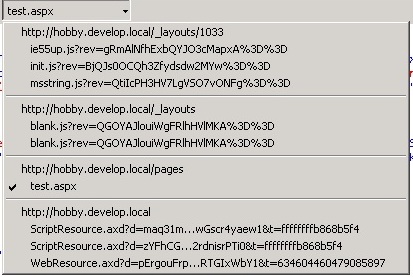
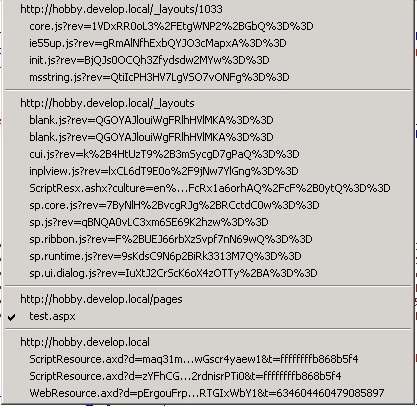
Below is shown what scripts are loaded with prefetch=0 or the default behaviour


Prefech=0
Default, every standard SP scripts is prefetched


Sunday, May 6, 2012


SharePoint and HTML5 Investigation Overview


This blog is meant to showcase my investigation on using SharePoint for HTML5 publishing solutions. It explains a visual studio project in which I tried to create a solution that allows you to create sites that utilize HTML5 for displaying engaging, interactive websites to visitors with new browsers while allowing content editors and legacy brower users to retain the standard SharePoint functionality.

There are three parts so far in the investigation:

Part 1 is about the background for the investigation on this subject, why HTML  5 + SharePoint.
Part 2 is about the work that was done, it contains links to the code and solution overview.
Part 3 is about the results that were found, and should get a discussion going on what can be improved and other possible paths to pursue.

Continue to Part 1